
Quick guide for Plunet for freelance linguists
Introduction
This short description is intended for freelance linguists who works with BeConnected. Plunet will help you received and deliver projects. This short description will give you an overview of basic functions in Plunet.
System Requirements
To access Plunet you need a web browser, preferably Internet Explorer (version 9 or higher), and access to the Internet.
Handoff email
When a job is assigned to you, you will receive a handoff email from the Project Manager. The email subject line will contain the project number and the email will contain other important information about the project.
Log in
Log in at beconnected.plunet.net or click on the link in the handoff email. Enter your username and password and log in. Should you encounter any problems during login please contact info@beconnected.no or your project manager.

If you attempt to log in unsuccessfully more than three times your account will be locked for 24 hours. Contact your Project Manager or info@beconnected.no to unlock the account.
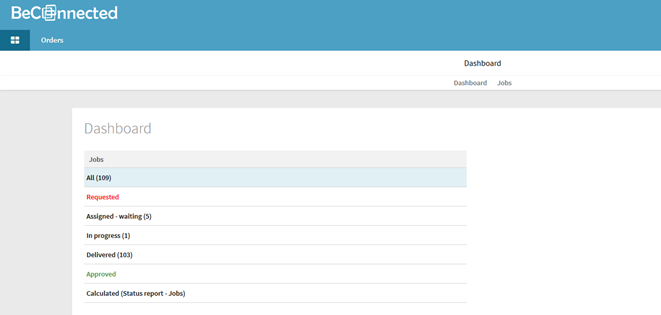
Under Home | Dashboard you have an overview of your current, completed and past projects.
Personal settings
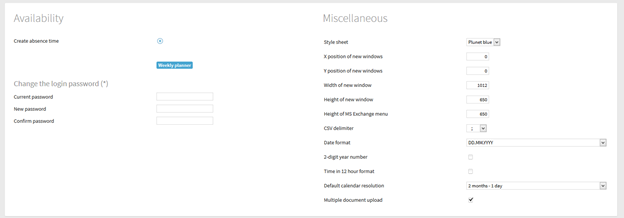
In the Home | Settings tab you can specify unavailability, change the interface language or color.
Download job data
Click on the download icon  in the job to download the files for the project. Check the Memo field for any important instructions or notes related to the project.
Deliver completed work
Log in to Plunet and select the job you want to complete. Click on the FileManager under Target Data and upload the files. Check all the instruction boxes to confirm that you have followed all guidelines. Add a delivery not as needed and chose partial or final delivery, as needed.
Support
If you encounter any problems with Plunet, please contact info@beconnected.no